 Gentle limits. Big impact.
Get your hours back from the scroll.
Mindful Guard caps Instagram Reels, YouTube Shorts and TikTok, and blocks any app you choose, so the feed stops when you said it would.
Free plan · No ads · No account · Android
- Reel Guard
- Reels, Shorts, TikTok, Facebook Reels, Spotlight
- Price
- Free plan · Premium optional
- Privacy
- No ads · No data collected
Willpower isn't the problem. The feed is.
Short-form feeds never end, so stopping is always your job. Mindful Guard moves that decision to a calmer moment: you set the limit once, and when it's reached, the feed closes.
- 1
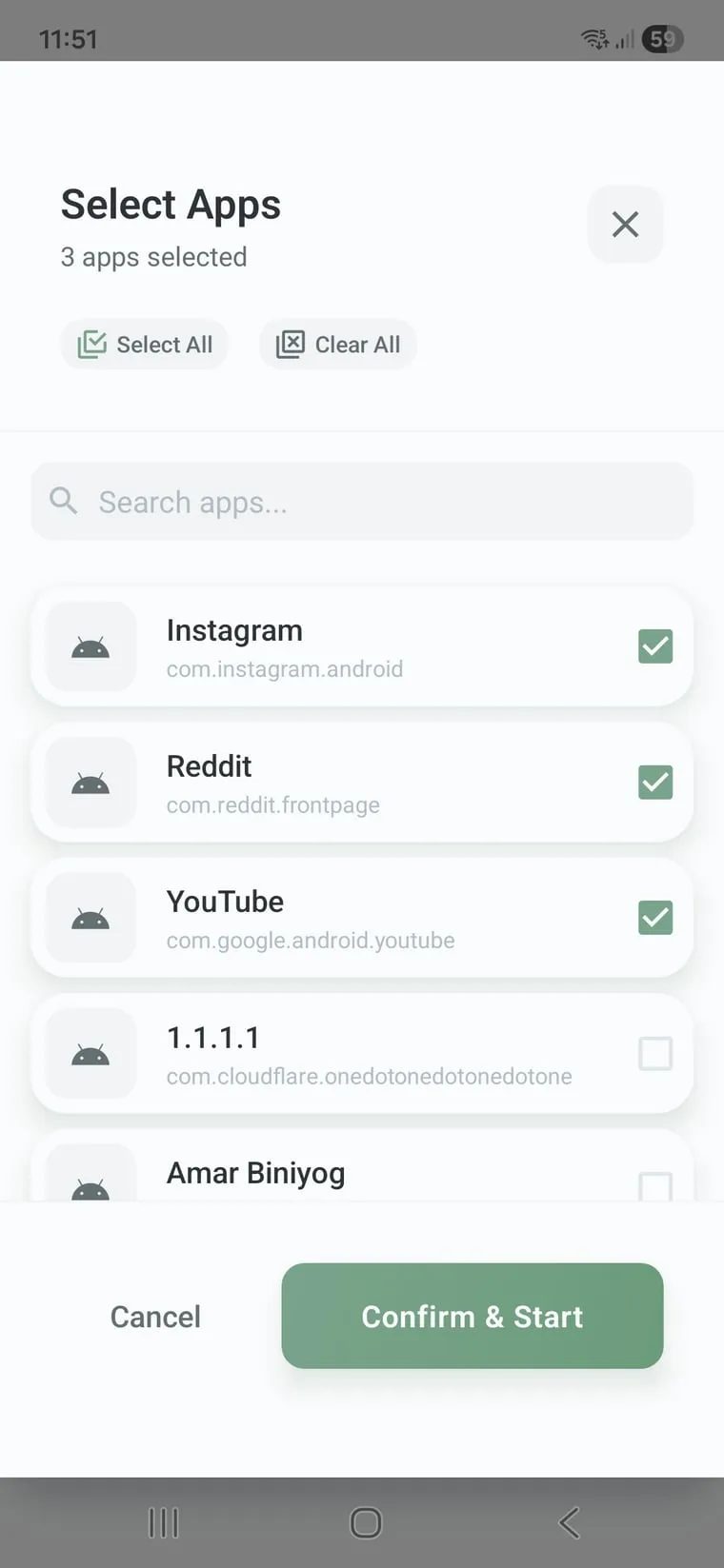
Pick what to guard
Choose the apps to block, or just the Reels and Shorts feeds inside them.
- 2
Set a limit or a time
A daily cap, a per-session cap, a quick focus timer or a weekly schedule.
- 3
Let the limit hold
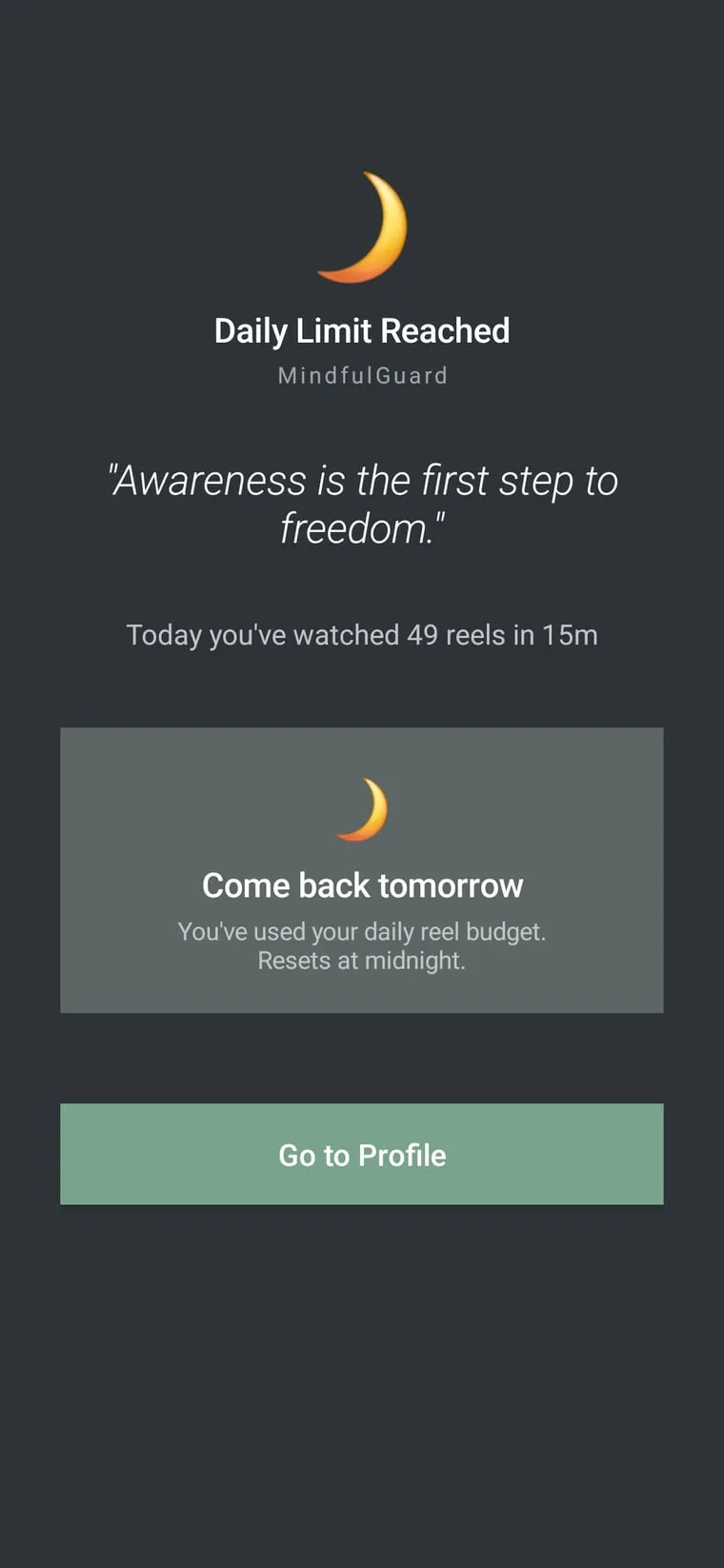
When time is up, a calm screen takes over. No override button, no "just one more".
Limit the feed, keep the app.
Reel Guard closes only the short-form feed. Messages, Stories and the rest of the app keep working, so you can still reply to a friend without falling into Reels.
- Instagram Reels
- YouTube Shorts
- TikTok
- Facebook Reels
- Snapchat Spotlight
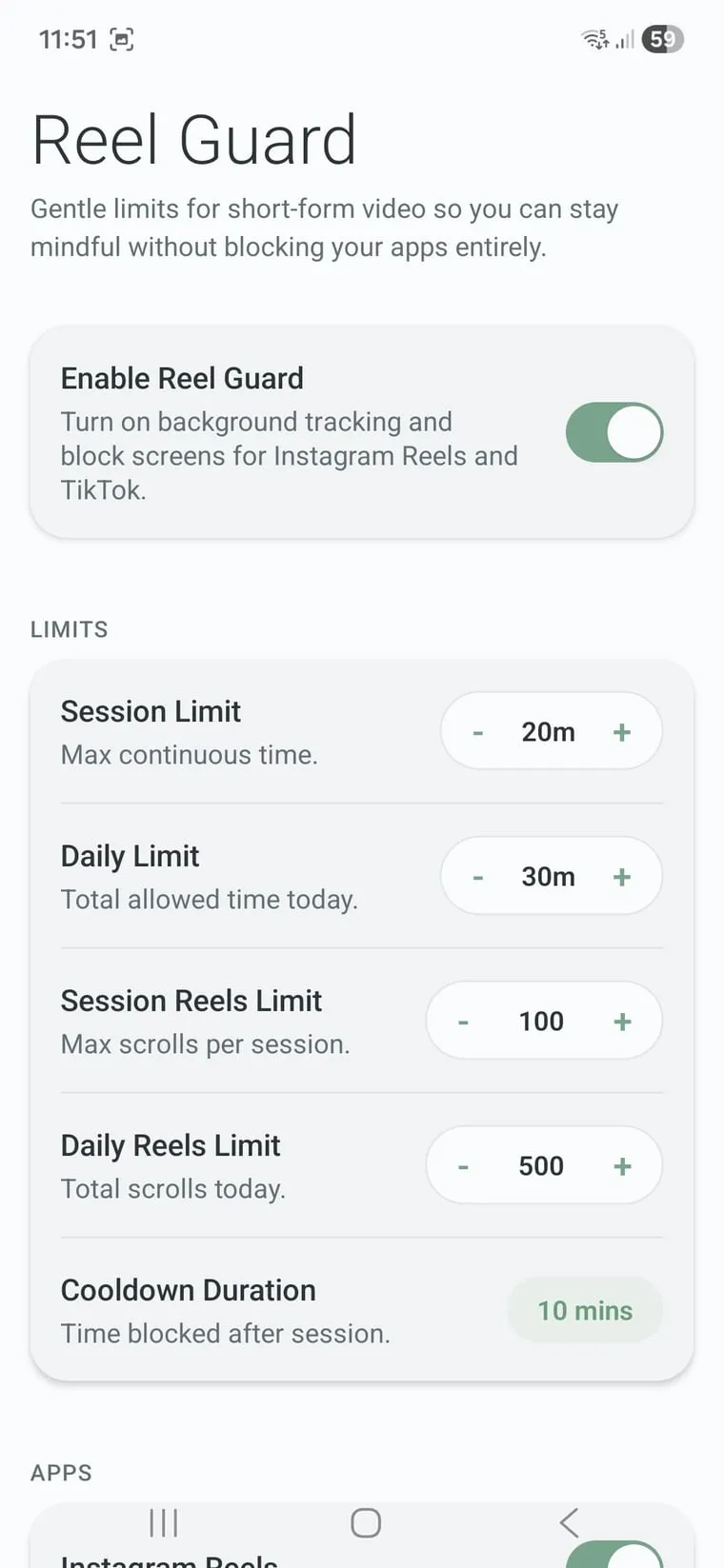
Session limit
Maximum continuous time in one sitting.
Daily limit
Total time allowed today.
Reel count
Cap how many reels you scroll per session or per day.
Cooldown
A break before the next session can start.
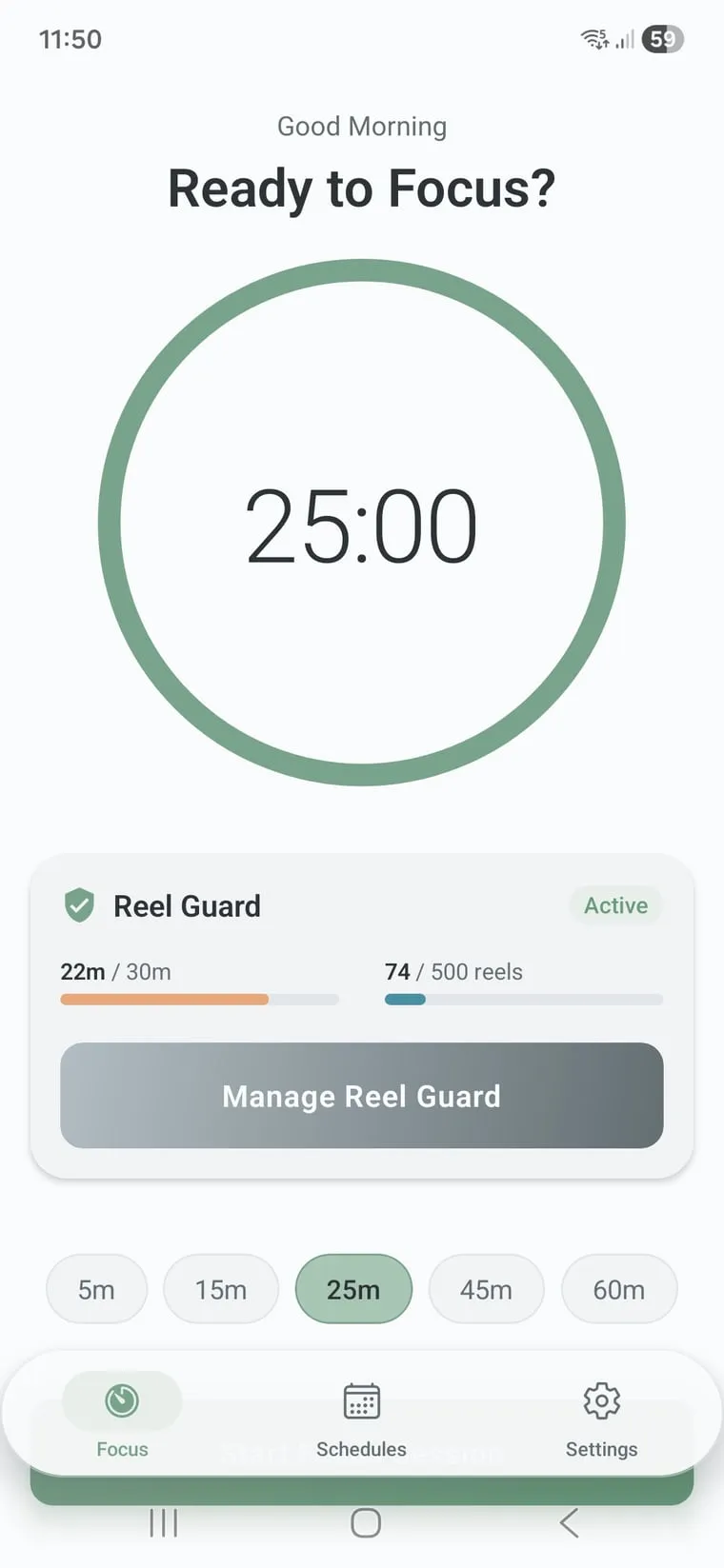
Three ways to stay out of an app.
Quick focus timer
Block your distracting apps right now, for 5 to 60 minutes. Made for a study block or a Pomodoro.
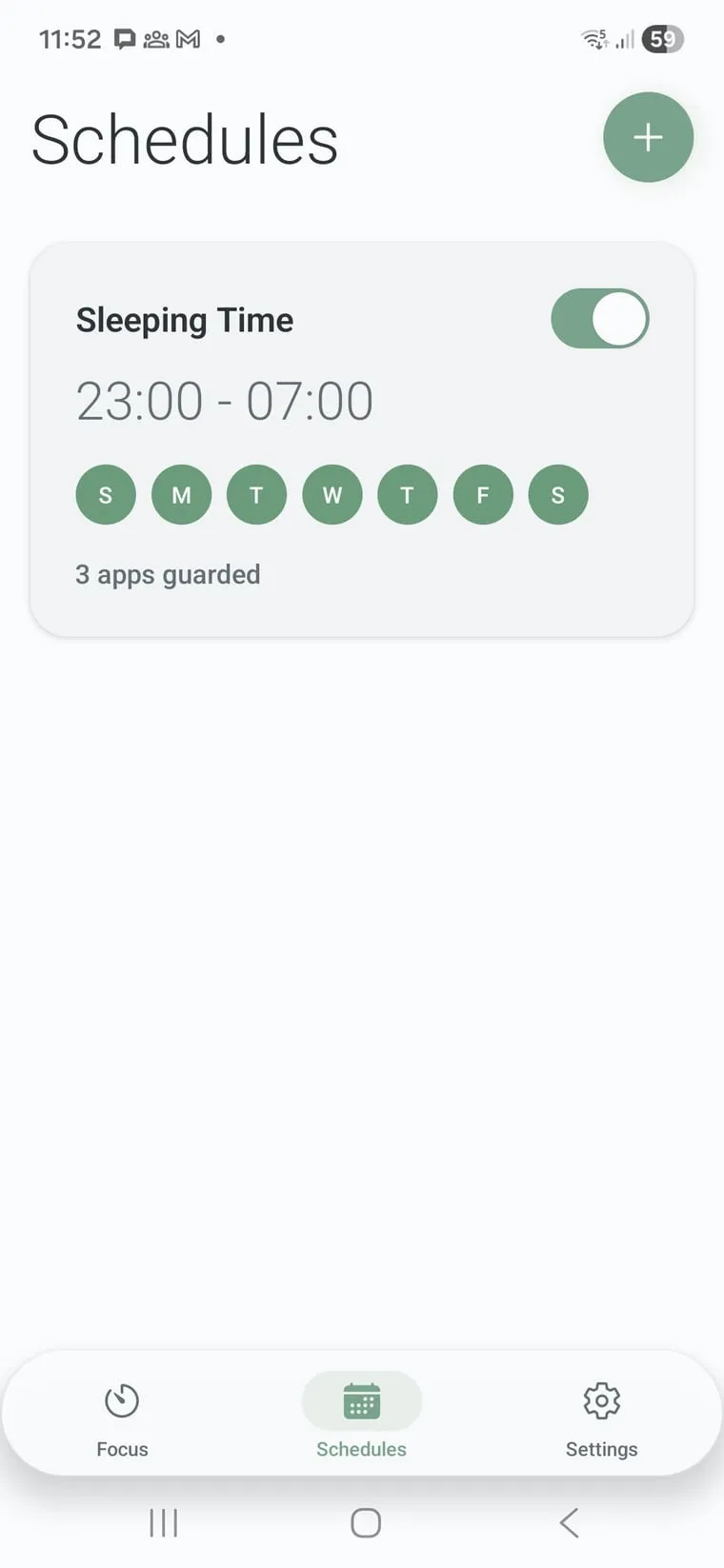
Weekly schedules
Work hours, sleep time, school days. Apps block and unblock on their own, every week.
Custom block lists
Separate lists for work, study and sleep, with suggestions based on what you actually open.
Your habits stay on your phone.
No ads, no analytics
Nothing in the app is there to sell your attention back to someone else.
No data collected
Google Play's Data safety section lists no data collected and none shared. Block lists, schedules and stats stay on the device.
Works offline, no account
Blocking runs on your phone. There's no sign-up, no cloud sync and no VPN.
Free, with an optional Premium
Start free. Premium unlocks more, as a monthly, yearly or one-time lifetime purchase. Google Play shows the price in your currency.
Read the privacy policyWhat Mindful Guard asks for, and why.
Accessibility Service
Detects when a blocked app or a short-form feed opens, so it can be closed in real time.
Display over other apps
Shows the calm "limit reached" screen on top of the app you were in.
Battery optimization exemption
Keeps blocking alive on phones that close background apps aggressively.
Mindful Guard vs Digital Wellbeing
| Feature | Digital Wellbeing app timer | Mindful Guard |
|---|---|---|
| Limit only Reels or Shorts | No, it times the whole app | Yes, per platform |
| Per-session limit | No | Yes, with a cooldown |
| Reel count limit | No | Yes |
| Quick focus timer | Focus mode, with a pause button | 5 to 60 minutes |
| When time is up | Easy to turn off in Settings | The block holds until it ends |
Questions people ask
What is Mindful Guard?
Mindful Guard is an Android app blocker with Reel Guard. It limits the short-form feeds in Instagram, YouTube, TikTok, Facebook and Snapchat with daily and per-session limits, and blocks any app you choose with a quick focus timer or a weekly schedule. It has a free plan, shows no ads and needs no account.
Can I block Reels but still use Instagram?
Yes. Reel Guard closes only the Reels feed when your limit is reached. Messages, Stories and the rest of Instagram keep working. The same applies to YouTube Shorts, TikTok's feed, Facebook Reels and Snapchat Spotlight.
Is Mindful Guard free?
Yes, you can start on the free plan. Premium unlocks more and is available as a monthly, yearly or one-time lifetime purchase. Google Play shows the price in your currency.
Does Mindful Guard collect my data?
No. Its Google Play Data safety section declares no data collected and no data shared with third parties. There are no ads, no analytics and no account. Your block lists, schedules and stats stay on your phone.
Why does it need the Accessibility Service?
Android's Accessibility Service is how Mindful Guard notices that a blocked app or a short-form feed has opened, so it can close it in real time. It is used only for blocking. Mindful Guard also asks to display over other apps, to show the limit screen, and to be exempt from battery optimization, so blocking keeps running in the background.
Does Mindful Guard use a VPN?
No. Mindful Guard blocks apps on the device using Android's Accessibility Service, so it never routes or inspects your network traffic.
Does it work on Samsung, Xiaomi and other phones that close background apps?
Yes. Allow Mindful Guard to ignore battery optimization when it asks. On phones that close background apps aggressively, such as some Xiaomi, Samsung and Huawei models, this keeps your limits and schedules running.
How is Mindful Guard different from Digital Wellbeing?
Digital Wellbeing's app timer covers a whole app and is easy to turn off in Settings. Mindful Guard can limit only the Reels or Shorts feed, cap each session, count reels, add a cooldown between sessions, and keeps a block in place until it ends.
Mindful Guard vs ScreenVeil: what is the difference?
Mindful Guard keeps you out of distracting apps and feeds. ScreenVeil, also by AppLass, turns your screen black while audio keeps playing, to hide the screen or save battery on AMOLED phones.
Guides from the AppLass blog

Put the feed back in its place.
Set one limit tonight and see what you do with the time tomorrow.
Get it on Google PlayFree on Google Play · Android