Back to Archive
UX
Verified on: 2026-03-23

Mobile Sticky Cart for Shopify: +15% Conversions (2026 Guide)

AT

AppLass Team

Article Author

Protocol Analysis (TL;DR) [ ANALYZE.READY ]

Mobile cart abandonment is killing your revenue. Here's how a sticky Add-to-Cart bar can boost Shopify conversions by 15%+ — with step-by-step setup.

Verified Content Entity

We live in a mobile-first world. 79% of smartphone users have made a purchase on their device in the last 6 months. However, mobile conversion rates (2.1%) are still significantly lower than desktop (3.5%). Why? Friction.

On a desktop, the “Add to Cart” button is usually always visible. On a mobile phone, as the user scrolls down to read reviews or descriptions, the button disappears. If they decide to buy, they have to scroll all the way back up. That split-second of effort is enough to cause a “micro-abandonment.”

The “Thumb Zone” Science

UX researchers map the phone screen into zones based on how easily a user can reach them with one hand.

  • The Safe Zone: The bottom center of the screen (Easy to reach).
  • The Danger Zone: The top corners (Hard to reach).

Most Shopify themes put the cart button at the top (Danger Zone). A Sticky Add-to-Cart Bar fixes this by anchoring the button to the bottom of the screen (The Safe Zone). It is always accessible, always visible, and right under the user’s thumb.
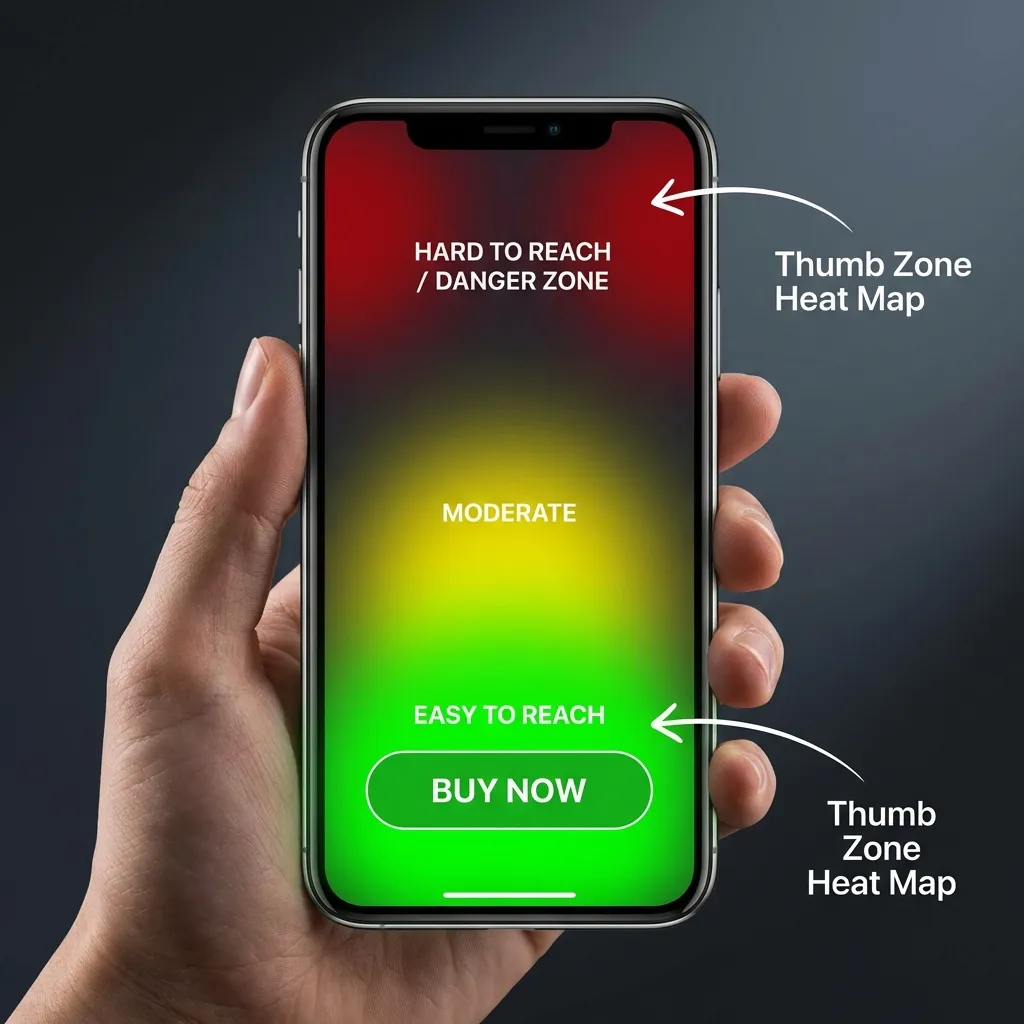
Mobile UX thumb zone heatmap for Shopify sticky cart optimization 2026

Results You Can Expect

  1. Reduced Friction: No scrolling required to buy.
  2. Higher CTR: Stickiness increases the visibility of your Call to Action (CTA).
  3. Better Data: FOMO Gen’s sticky cart includes analytics, so you can see exactly how many clicks are coming from the sticky bar vs. the main button.

Beyond the Button

Sticky carts are just the beginning. See the full conversion architecture in our E-commerce Performance Pillar.

Action Plan

Don’t let mobile visitors bounce because they can’t find the button. A sticky cart is a “set and forget” optimization that pays dividends immediately.

🚀 Ready to boost conversions? FomoGen includes a built-in sticky cart — plus social proof, countdown timers, and stock alerts — all in a sub-2.1KB payload.

Install FomoGen on Shopify →

Technical Clarifications

Frequently Asked
Questions

[ Protocol.Entry_01 ]

Does a sticky cart slow down my Shopify site?

Not if implemented correctly. FomoGen's sticky cart adds less than 2.1KB to your page — lighter than a single tracking pixel. It has zero impact on Core Web Vitals or Google PageSpeed scores.

[ Protocol.Entry_02 ]

Should the sticky cart be at the top or bottom of the screen?

Bottom. UX research on the 'thumb zone' shows that the bottom-center of a mobile screen is the easiest area to reach one-handed. Placing your Add-to-Cart button there reduces friction and increases tap rates by 15%+.

[ Protocol.Entry_03 ]

Do sticky carts work on all Shopify themes?

Yes. FomoGen's sticky cart is injected as a lightweight overlay that works on any Shopify theme — Dawn, Debut, custom themes, and headless builds — without modifying your theme code.

[ Protocol.Entry_04 ]

What is the conversion rate difference between mobile and desktop on Shopify?

The average mobile conversion rate on Shopify is 2.1% compared to 3.5% on desktop. The primary cause is friction — mobile users lose the Add-to-Cart button when they scroll. A sticky cart closes this gap significantly. See the full data in our [E-commerce Performance 2026 Benchmarks](/ecommerce-performance-2026-benchmarks).