When Android introduced Digital Wellbeing in 2018, it felt like the right move. A major platform acknowledging that screen time was a problem and building tools to address it directly — that was progress.
Eight years later, the honest assessment is more complicated.
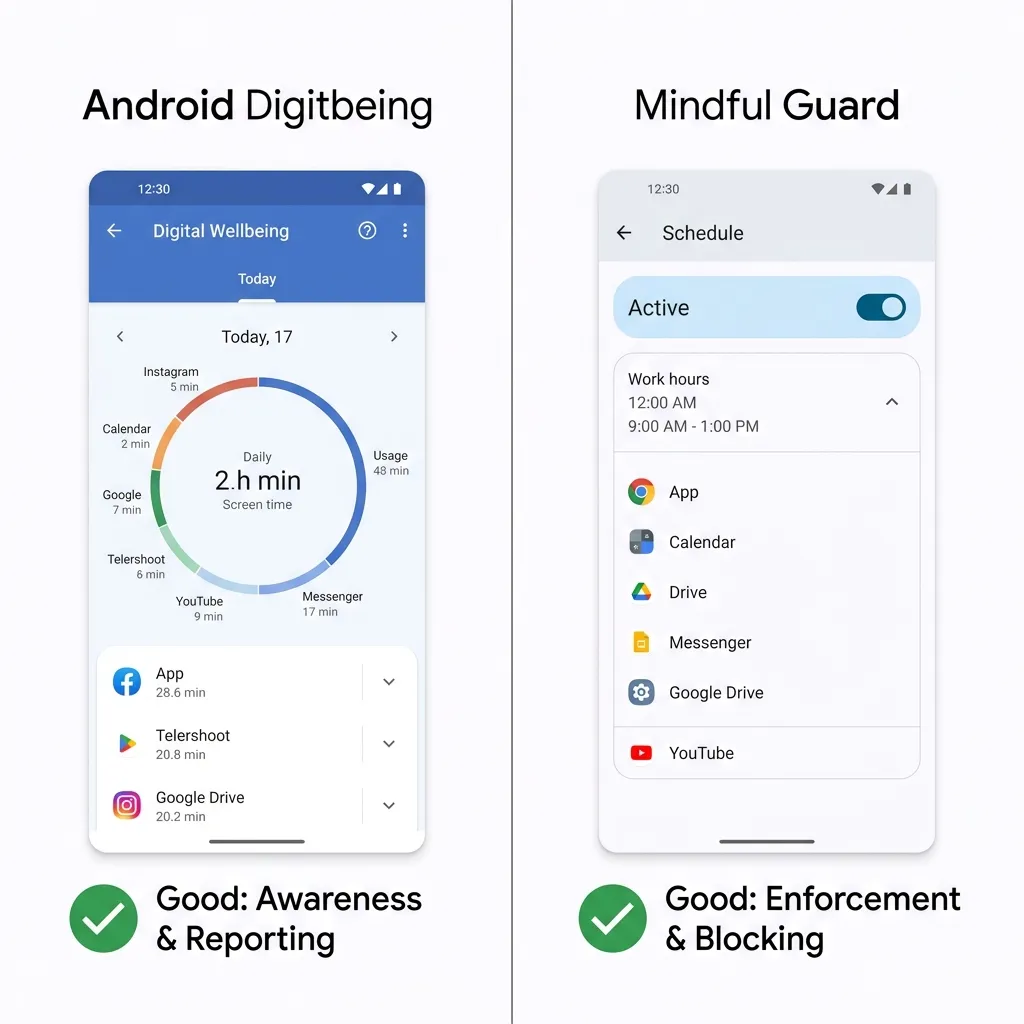
Digital Wellbeing is still there, still mostly unchanged, and still running on the same fundamental design assumption that caused problems from the start: that people primarily need information about their phone habits, not enforcement of better ones.
If you’ve ever set a 30-minute daily limit on Instagram, watched the notification appear at 29 minutes, and tapped “Ignore for today” — you already understand the gap this article is about.
This isn’t a hit piece on Digital Wellbeing. It does some things genuinely well. But if you’re reading this, you’ve probably already sensed that it isn’t solving your focus problem. This comparison will show you exactly why, what a more effective alternative looks like, and how to decide which tool — or combination of tools — is right for your situation.
What Digital Wellbeing Actually Does Well
Before getting into the limitations, it’s worth being fair about where Digital Wellbeing genuinely delivers.
Screen time reporting is accurate and useful. The weekly summaries showing your top apps, total daily usage, and unlock frequency give you real data about your habits. This awareness layer has value — you can’t change a pattern you can’t see.
Bedtime mode is underrated. The feature that shifts your display to grayscale and silences notifications after a set time is simple, effective, and genuinely helps with the pre-sleep scrolling habit that ruins sleep quality for a lot of people.
Focus mode works well for short, intentional work sprints. Tap to activate, choose your blocked apps, set a timer. For structured Pomodoro-style sessions where you’re already motivated and just need a nudge, it’s adequate.
Zero setup friction is a real advantage. Digital Wellbeing is pre-installed, requires no additional permissions beyond what Android already has, and most users can set a basic time limit in under two minutes.
For someone who just wants a general sense of how much time they’re spending on their phone and occasionally wants to disconnect for a few hours, Digital Wellbeing is fine. The problem starts when you need it to do more than that.
Where Digital Wellbeing Falls Short
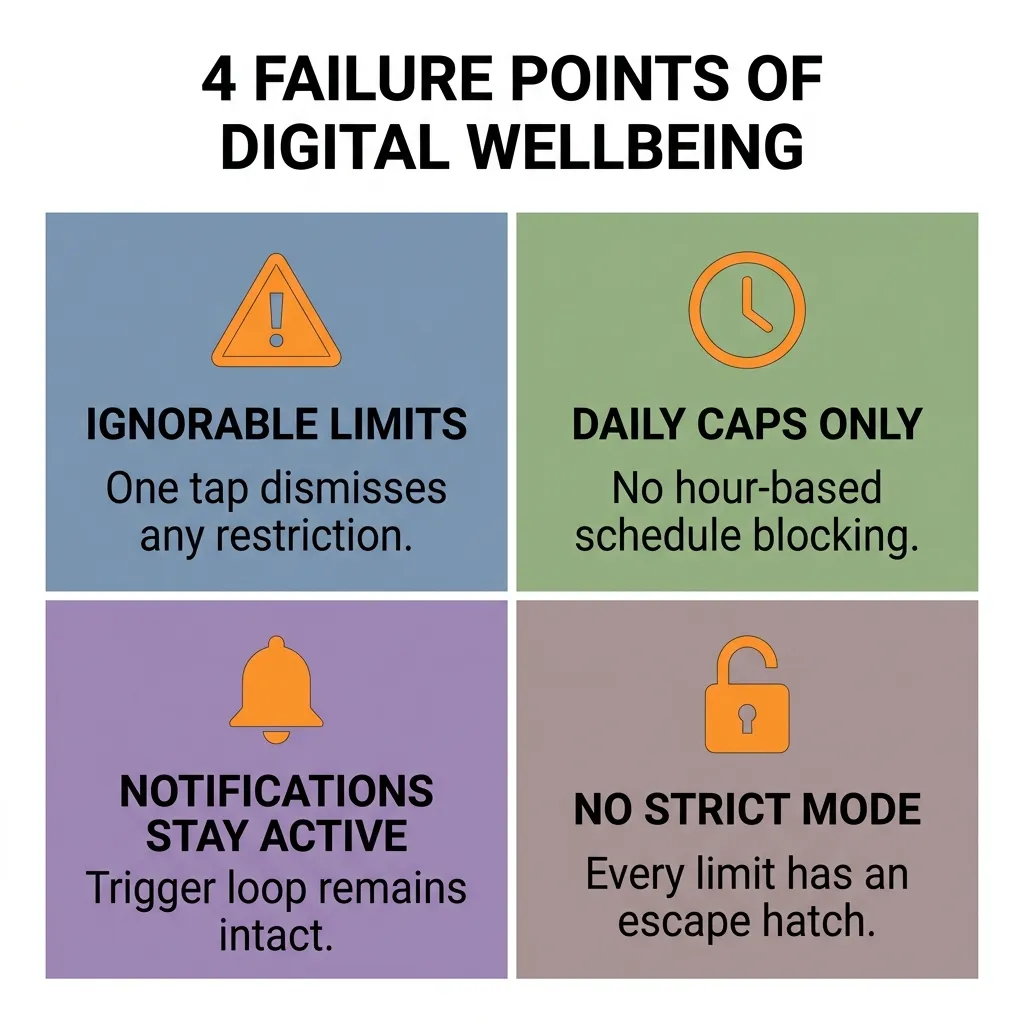
The “Ignore for Today” Problem
This is the central failure of Digital Wellbeing’s design, and it stems from a philosophical choice that turns out to be wrong in practice.
Digital Wellbeing treats phone overuse as an awareness problem. The assumption is: if you know you’ve used Instagram for 30 minutes, you’ll choose to stop. The “Ignore for today” button exists because the designers believed users should always retain ultimate control.
In theory, that sounds respectful of user autonomy. In practice, it means the system has no real enforcement power. The moment you see that notification and feel the urge to keep scrolling, the override button is right there — and tapping it requires less cognitive effort than stopping does. You will tap it. Almost everyone does.
This isn’t a character flaw. It’s the predictable outcome of a system that requires willpower at the exact moment willpower is most depleted.
Time Limits Without Scheduling
Digital Wellbeing’s time limits are daily caps, not schedule-based blocks. You get 30 minutes of Instagram per day — but you can use all 30 minutes at 7 AM if you want, leaving nothing enforced for the rest of the day.
What most people actually need is not a daily cap but a window-based block: Instagram is unavailable from 9 AM to 5 PM, regardless of how much or how little you’ve used it. That’s a fundamentally different constraint, and Digital Wellbeing doesn’t offer it.
Notifications Still Come Through
Even when an app is at its time limit, Digital Wellbeing doesn’t block its notifications. Your Instagram badge still shows new likes. Your Reddit notifications still ping. The visual and auditory cues that trigger the opening habit remain fully active — meaning the temptation loop starts even when the app is technically restricted.
No Strict Mode
There is no configuration in Digital Wellbeing that makes limits genuinely unbypassable. Every restriction has an escape hatch. For people who are seriously trying to change a deep-rooted phone habit, this makes the tool functionally useless during the hardest moments — which are exactly the moments when the tool is supposed to help.
Data and Privacy
Digital Wellbeing sends usage data to Google as part of the broader Android telemetry ecosystem. For most users this is a minor concern, but for anyone serious about digital privacy — or who simply doesn’t want their app usage patterns logged and associated with their Google account — it’s a relevant consideration.
How Mindful Guard Fills the Gap
Mindful Guard was built around a different design assumption: that the problem isn’t awareness, it’s architecture. People generally know they’re using their phone too much. What they need is a system that makes distraction structurally harder, not a dashboard that shows them how distracted they’ve been.
Here’s how that plays out in practice across the same dimensions where Digital Wellbeing falls short.
Hard Schedule Blocks
Mindful Guard blocks apps by time window, not by daily cap. You define a schedule — 9 AM to 5 PM, Monday through Friday — and during that window, the blocked apps simply do not open. There’s no notification asking if you want to ignore it. There’s no daily allotment you can front-load. The window is the rule.
This is the single most important difference. It removes the decision entirely during your defined focus hours, which is the only approach that reliably works when motivation is low.
Strict Mode With No Override
In Strict Mode, there is no override button on the block screen. The app is unavailable until the schedule expires. This sounds severe, but it’s what serious focus requires — a system that holds the line on your worst days, not just your best ones.
Standard Mode still exists for users who need occasional legitimate access to blocked apps. But the option to go strict is there when you’re ready for it.
Notification Suppression
When Mindful Guard blocks an app, its notifications are suppressed simultaneously. No badges, no sounds, no banners. The trigger loop — notification → urge → open app — is broken at the first step, which is where it needs to be broken.
Zero Telemetry Architecture
Mindful Guard operates entirely on-device. It requires only Usage Access permission — the standard Android permission for monitoring foreground apps — and collects no personal data, no usage logs, and no identifiers. Nothing leaves your phone. For users who are already concerned about data privacy, this is a meaningful distinction from a Google-native tool.
Multiple Schedule Profiles
You can create different schedules for different contexts — a strict morning block from 6 to 8 AM, a work block from 9 AM to 5 PM, a lighter evening wind-down block. Each schedule has its own app list and block mode. The flexibility allows you to match the system to your actual life rather than forcing your life into a single daily limit.
Head-to-Head Comparison
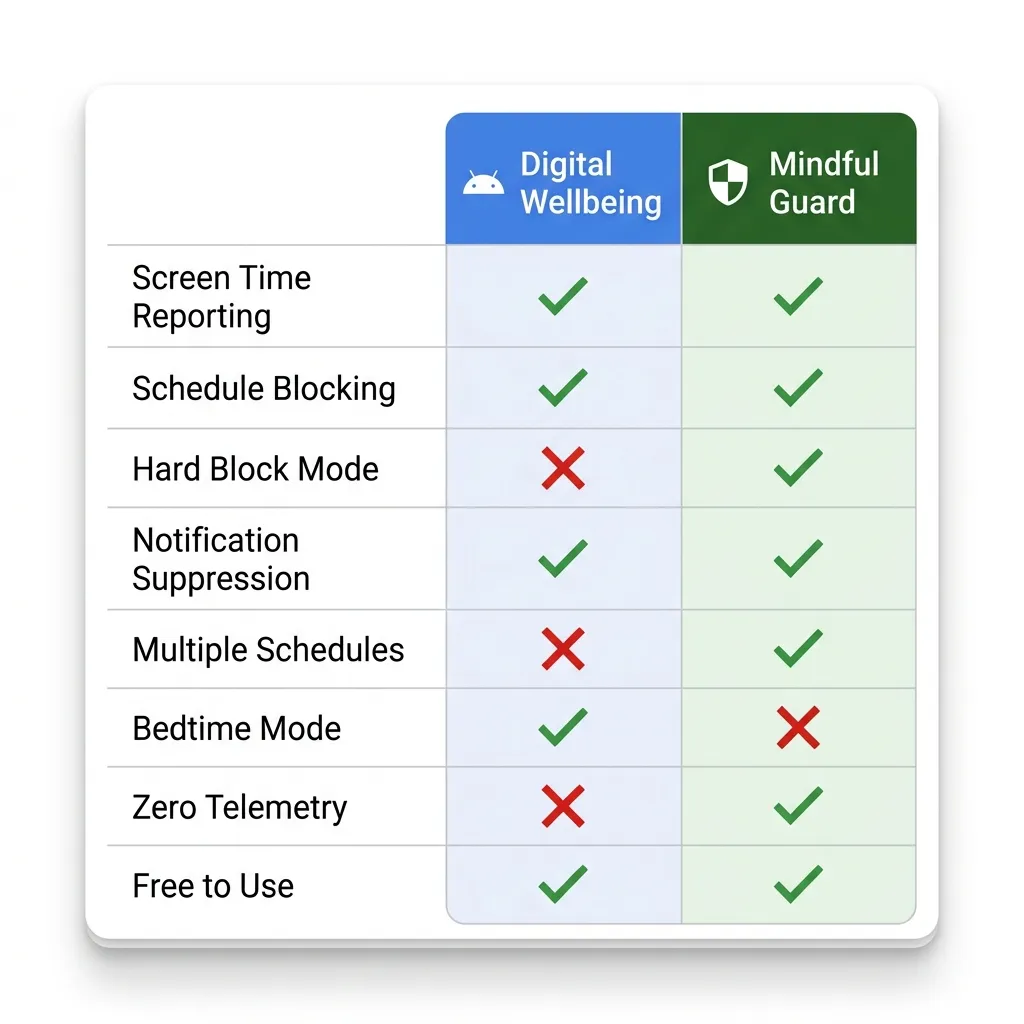
| Feature | Digital Wellbeing | Mindful Guard |
|---|---|---|
| Screen time reporting | ✅ Yes | ❌ No |
| Schedule-based blocking | ❌ No | ✅ Yes |
| Hard block (no override) | ❌ No | ✅ Strict Mode |
| Notification suppression | ❌ No | ✅ Yes |
| Multiple schedule profiles | ❌ No | ✅ Yes |
| Bedtime / grayscale mode | ✅ Yes | ❌ No |
| Zero telemetry | ❌ No | ✅ Yes |
| Pre-installed | ✅ Yes | ❌ Requires install |
| Free | ✅ Yes | ✅ Yes |
The pattern is clear: Digital Wellbeing wins on awareness and convenience. Mindful Guard wins on enforcement and privacy. They’re solving different problems.
Which One Should You Use?
The answer depends on where you are with your phone habits.
Use Digital Wellbeing if:
- You want a baseline understanding of your screen time without installing anything new
- Your phone use feels manageable and you just want occasional gentle nudges
- You primarily need the bedtime or grayscale mode for better sleep
- You’ve never tried any focus tool and want to start with zero friction
Use Mindful Guard if:
- You’ve tried Digital Wellbeing’s time limits and found yourself ignoring them
- You need apps to be genuinely unavailable during specific work hours
- You want notification suppression alongside app blocking
- Privacy matters to you and you’d prefer a zero-telemetry architecture
- You’ve tried willpower-based approaches and they haven’t held
Use both if:
- You want Digital Wellbeing’s reporting dashboard for passive awareness
- And Mindful Guard’s schedule enforcement for active focus protection
This is actually the most complete setup. Digital Wellbeing tells you what’s happening with your screen time over time. Mindful Guard prevents the worst of it from happening during your most important hours. They don’t overlap — they complement each other.
The Honest Bottom Line
Digital Wellbeing is a well-intentioned tool that solves the wrong problem. It assumes you need information. Most people who struggle with phone distraction already have the information — they know they’re on their phone too much, they know which apps are the problem, and they know when it’s happening. What they lack is a system that holds the boundary when their in-the-moment self doesn’t want to.
Mindful Guard is that system. It’s not a replacement for Digital Wellbeing’s reporting features, but for the part that actually matters — keeping you off distracting apps during the hours when your focus has the most value — it does what Digital Wellbeing cannot.
The goal isn’t to find the perfect app. It’s to build an environment where focused work is the path of least resistance. These two tools, used together, get you closer to that environment than either one alone.
Ready to add real enforcement to your focus setup? Mindful Guard is free, requires no account, and takes under 5 minutes to configure. Zero data collected. Entirely on-device.
Related: Now that you understand the tools, read how to block social media on Android during work hours only for a step-by-step setup guide that puts Mindful Guard to work immediately.